
Kia Ora, it’s been a while! Lots has happened and I haven’t really had much time trying to work on the repo whilst working and (drumroll) prepping to move back home! Gosh I’m excited!
I’ve been pondering how to write this post since I did quite enjoy building the repo (link here), but when it comes to actually writing about it afterwards I kind of can’t be bothered
Alas, all you readers out there (literally just me reading my own blog, nice) have of course been waiting in hot anticipation of this post so I will not let you down!Problem-solving engineering-y stuff
Despite my excellent planning I ran into a few issues. Some of these I solved, some still need solving.
Beep boop, major blockage
The major one that still needs solving is really the premise of the whole project; getting the live-connection to government data. It is my first time setting up APIs / python scripts that can access these so I accepted that it might be difficult for me to figure out. But what I didn’t account for is the internet being so enshittified and full of scrapers that government apis need to add so many security features that end up preventing people like me from downloading data using (my) python scripts, too. I managed to get scripts running that, for instance, download anything from the IMDB or rottentomatoes but the same scripts get blocked when I try to run them through the stats new zealand API. Annoyingly, for a project on Aotearoa public data, having the former is not really that useful, and my eyes were on the price, aka the latter.
I spent some time trying to build workarounds but realised that these may be a bit too cheeky. I don’t really want to encourage anyone that would use this repo to run scripts that try to get around security features for government data (lol). To see what else I could do I contacted stats new zealand, and a very lovely PM got back in touch with me that offered to put me on an exempt-list so that my scripts aren’t blocked by the safeguards. So wondeful really, I feel so encouraged! But since my plan was to make this a public repo that would allow anyone to use/access the data it would be necessary for every person that downloads the repo to also be added to this list. So that’s probably not in the spirit of the desired level of simplicity that I want within the repo. I considered building csv files manually using a different type of access but the resulting files are of course static (and the way I had built that workaround was, imo, also a little cheeky). Since I specifically wanted to enable live-access, this is also not an option. I have tabled the issue for the moment to kind of let it marinade in the back of my brain until a solution magically presents itself (ha).
Succes!
Now, to the solved issue(s)! I am happy to report that otherwise my little plan for the repo has worked out. I have built something that faciliates a relatively simple data analyst workflow. I learnt a lot about what the workflow looks like from an ‘engineering’ perspective and I feel like I have become quite a bit more confident whn it comes to solving issues. I am a lot more comfortable with the command line, too. I think there’s a massive difference between ‘coding’ within jupyter notebooks or a dbt repo that is maintained by engineers at work, and ‘coding’ that is required to make these things run in the first place. I will definitely write about what I think about this another day but the tldr is that I am very glad I udnerstand this a bit better now, and am in awe of people who do this professionally.
The requirements I had, and if they are available:
Everything need to be free!
Yes, it is all free!
Anyone with basic data analyst- or coding-like knowledge should be able to download the repo.
Yes, I built the repo itself, and added a Readme file that instructs how to download the repo and make it run for the first time. I added a ‘daily setup’ readme file that explains the daily workflow within the repo, i.e. how to make changes, build tables, access them in the database. I tested it extensively and hopefully this will do the trick.
Anyone should be able to download the data I want to make available.
Yes, this is possible now! I had to build a database where one still has to download a database management tool to view the data. I also had to create a separate database to allow building data models and test-running them in the repo, and consuming the data in the way of viewing models and exploring the data via the database management- or data visualisation tool (e.g. DBeaver or Tableau).
The full pipeline
I have drawn up what the pipeline looks like below. I am going to leave it at that as I hope it is reasonably self-explanatory.
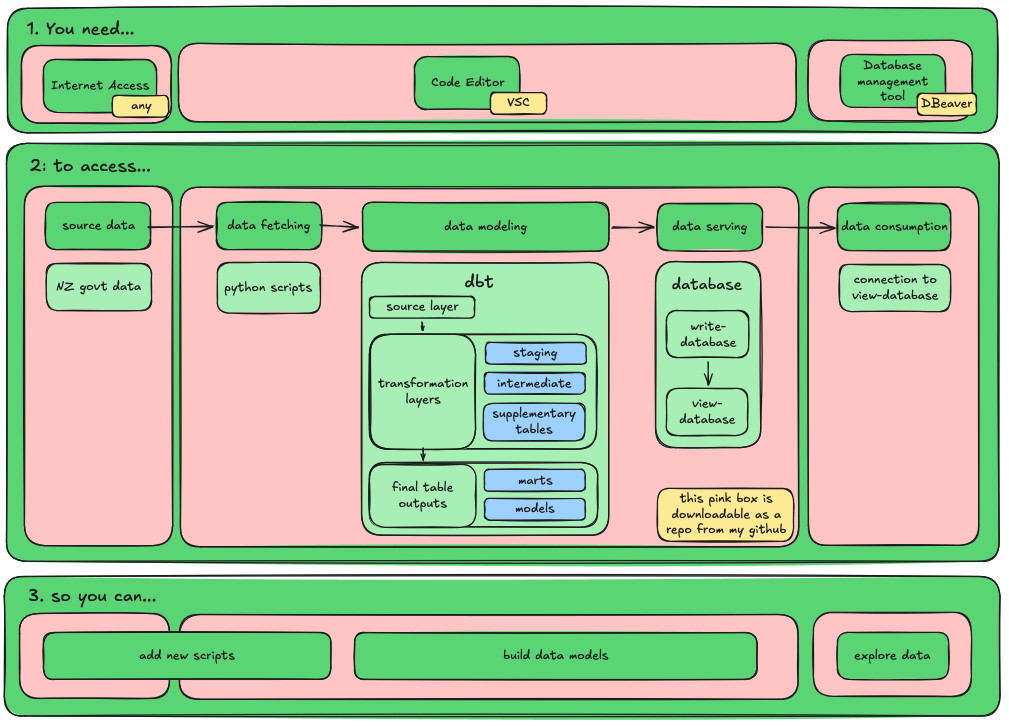
What’s in the repo
I have played around with the repo a little bit using some test-csvs, purposely tried to break it etc, and everything seems to be working well.
So far it contains:
- all the scripts that make what I described above run. However, there are no scripts yet that can pull the government data (as I described the issue above).
- a standard dbt set-up in line with current best practises (e.g. including ‘marts’).
- I also popped in a calendar dimension (dim_calendar), woo!
The calendar is a standard calendar that dynamically creates rows on day-granularity for the previous 50 and next 50 years when the build/run command is run. The columns include some relational info (e.g. prior_date_day, or prior_year_date_day). I also added some New Zealand context, e.g. there are columns for te reo day- and month-names. I will enhance this dimension once I’ve collected new ideas (e.g. one addition I already want to make are booleans like is_today).
So far, I’ve had a lot of fun trying to build this and figure out what else is needed in here so I will keep chugging along and add as I go. I am quite keen on getting some kind of data in from different agencies and analyse it, so I think I probably have to get back to the whole python-script issue. See you soon!