
Repo / pipeline requirements
I have a set of parameters in mind that I think are important for this repo when it comes to the set-up, i.e. repo, its pipeline, & the tooling:
- everything needs to be free
- anyone with basic data analyst- or coding-like knowledge should be able to download the repo
- anyone should be able to download the data I want to make available
- the data should be cleaned enough to make it possible to run analyses without a massive hassle (*issue for later)
What the pipeline looks like
I did some reading / redditing / googling to figure out how to continue from here to meet all the parameters. It did make me realise that I use so many tools all the time but I don’t know the correct terminology for some. Generally it’s not a problem in my daily work, but when I try to build something from scratch I need to know the correct terminology so it’s easier to troubleshoot (shocking, I know).
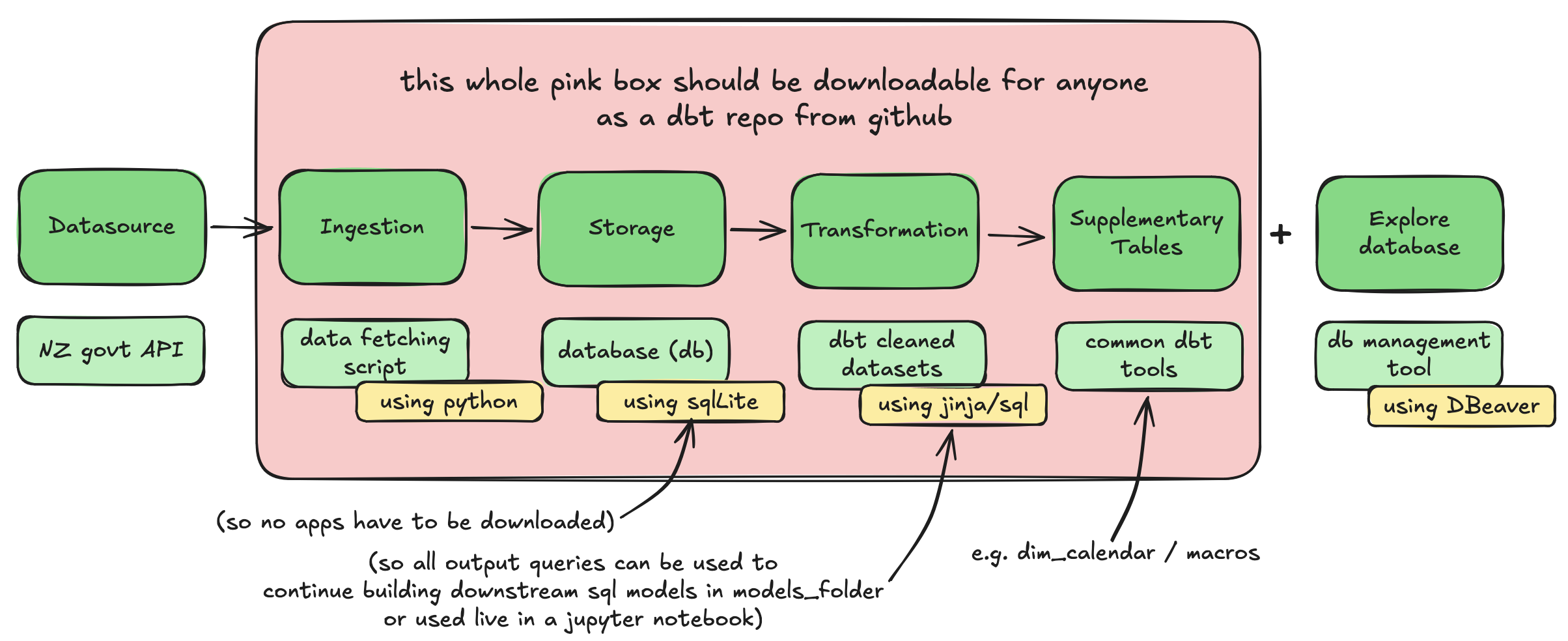
I made a lil drawing of it here:
Tooling decisions
I decided that the best way to make the repo self-contained (i.e. the pink box in the viz above) is to:
-
use a python script that fetches the data from the API(s)
-
include SQLite as the database
- this does not require any sign-ups to any website / apps
- the database is loaded within a single file within the repo
- it has integrations for all database management tools
-
pivot on the whole ‘no app download’ thing.
- I did realise that I cannot actually make this happen because to view the database / output tables it is always necessary t ohave a database management tool.
- I found one that was quick to download and doesn’t require signing up (and looks like lots of people are happy with it?) which is called “DBeaver”. As I was testing my first set-up it was working well so I will stick to it for now.
-
include a starting command that the person can run when they load the repo / want to get analysing. I was thinking that this would be a good way to keep it simple. The command should:
- install dependent packages
- fetches the data from the API and runs all downstream dbt queries that clean the api data
- loads the data into the database
- activates dbt to allow running of standard dbt commands within the command line
I can set up the basic repo (excluding the cleaned tables) and then create the starting command when I have a working pipeline. After that I can probably slowly work my way through the source tables to clean them up a little bit.
The basic repo is set up, woo
Here’s a link to the repo that I managed to put together so far.
I followed this youtube video to get my first lil set-up so I have a “shell” for a dbt repo in github, i.e. I have my ‘workstation’ set up. The video was relatively easy to follow so can definitely give this one a recommend!
I managed to connect SQLite to it with some googling, following a mishmash of these instructions and these instructions. So now I can run tables from my repo (I used the pre-loaded sql query to test it). They load into SQLite and I can view them in DBeaver - Yay! It took a bit of fiddling and understanding so I feeling very accomplished :-D
Next I am going to build a fetching script to fetch data from an API. I’m using the API from Te Taahuhu o te Maatauranga (Ministry of Education). It’s my first time writing a fetching script and this specific API doesn’t seem to be working that well so I need to tinker with it a little bit - looking forward to getting it going and will keep updating here ofc!